
Payments to Make
Manage payments for validated expenses pending settlement.
Introduction
This page lists all validated expenses that have not yet been paid. Financial managers can record payments made.
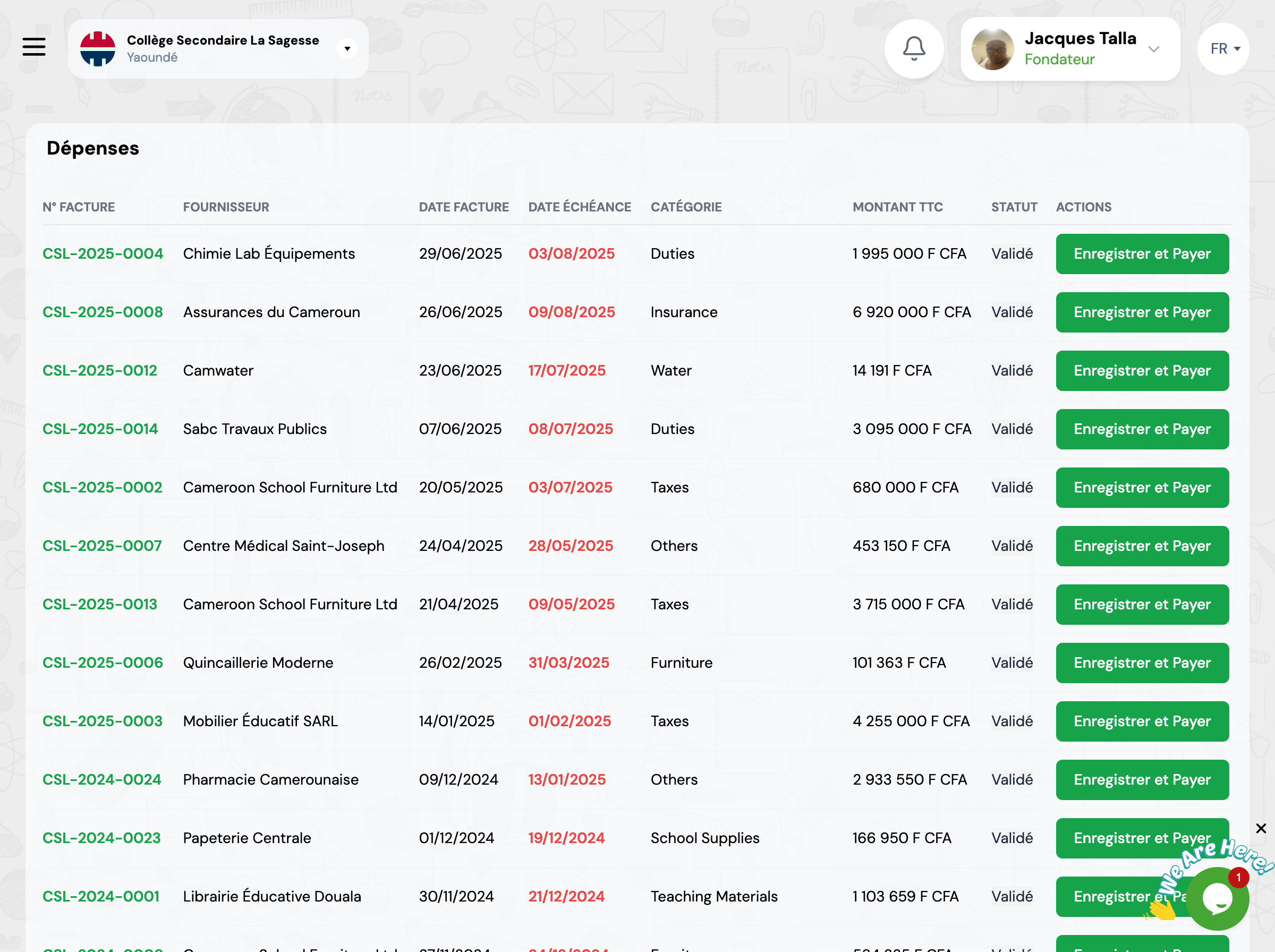
Overview
The table displays all expenses with 'Validated' status, sorted by due date to facilitate cash flow management.
Invoice Number
Unique reference of the invoice or expense
Supplier
Name of the supplier to be paid
Amount
Total amount to be paid
Due Date
Payment deadline
Category
Type of expense (supplies, equipment, etc.)
Status
Payment status (Pending, Paid, etc.)
Payment Methods
Several payment methods are available to record your settlements.
Cash
Payment in cash directly to the supplier
Check
Payment by bank check with reference number
Bank Transfer
Electronic transfer from the institution's account
Mobile Money
Payment via Orange Money, MTN Mobile Money, etc.
Recording a Payment
To record a payment, follow these steps.
Select the Expense
Click on the expense to pay from the list
Verify Information
Ensure the amount and supplier are correct
Choose Payment Method
Select how the payment was made (cash, check, transfer, etc.)
Record the Payment
Click 'Record and Pay' to validate and attach proof if necessary
Next Steps
After recording your payments:
