
HR Reports
Generate detailed reports and analytics to track HR performance and make informed decisions.
Introduction
The HR reports module allows you to generate detailed analytics on all aspects of staff management. From pre-built reports to custom analyses, get the insights you need to optimize your human resources management.
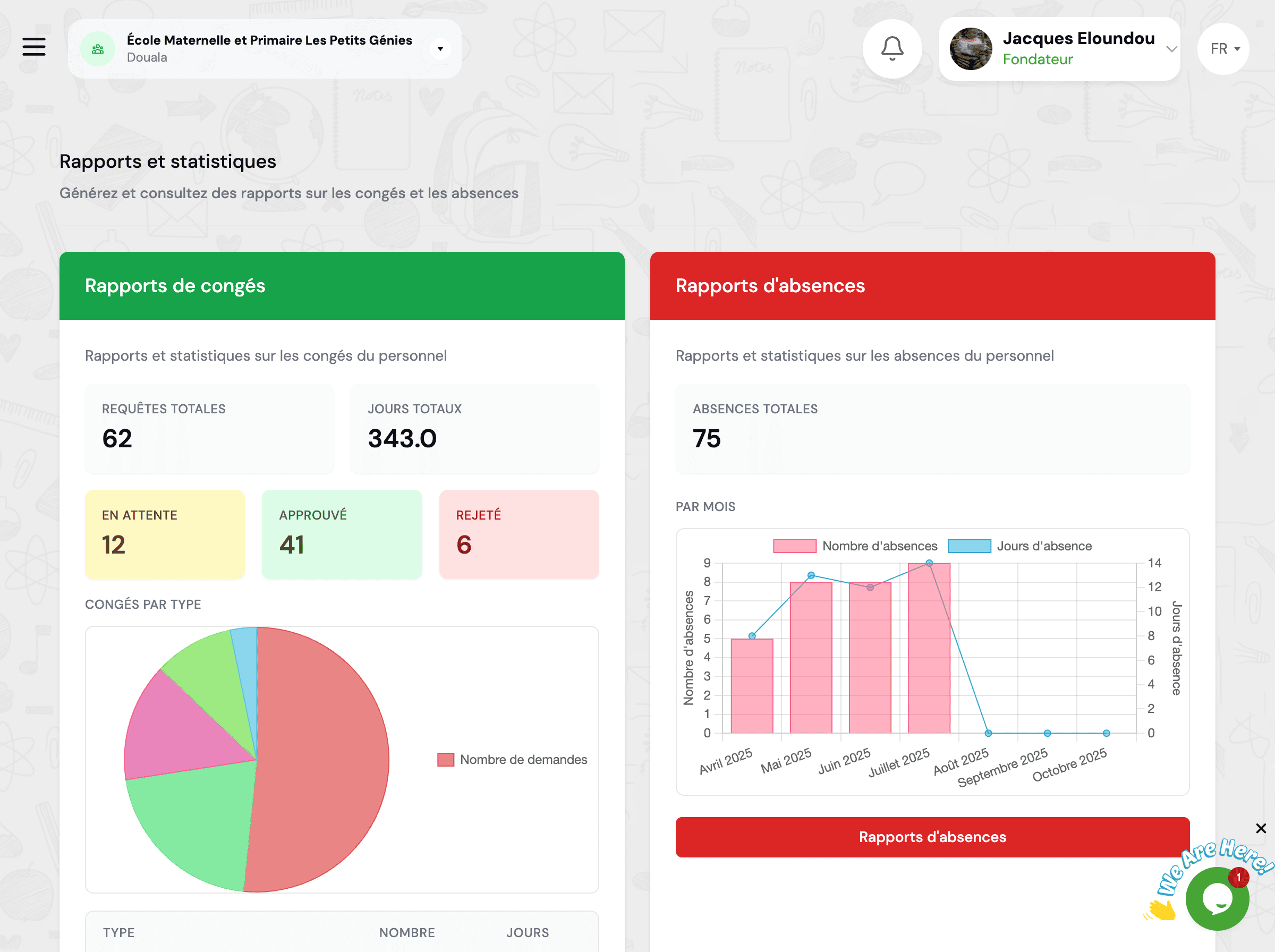
- Data-driven decision making with real-time analytics
- Time savings with automated and schedulable reports
- Regulatory compliance with complete traceability
- Clear visualizations with charts and dashboards
- Multiple exports (Excel, PDF, CSV) for easy sharing
- Complete customization according to your specific needs
Available Report Types
GO4SRH offers a wide range of pre-built reports to meet all your HR analysis needs.
Workforce Reports
Detailed analyses of your workforce composition and evolution.
- Staff distribution by function, department, contract type
- Workforce evolution over a given period
- Age pyramid and seniority
- Turnover rate and rotation rate
- New hires and departures
- Workforce projections and future needs
Leave Reports
Complete statistics on leave usage and management.
- Leave balances by employee and by type
- Annual leave utilization rate
- Pending, approved, rejected requests
- Calendar of planned absences
- Unused leave and risk of forfeiture
- Leave costs and financial impact
Attendance Reports
Detailed tracking of attendance and punctuality.
- Daily, weekly, monthly attendance rate
- Delays and unjustified absences
- Overtime and working hours
- Manual vs automatic clock-ins
- Comparison by department or function
- Absenteeism trends and patterns
Payroll Reports
Financial analyses and payroll reports.
- Total payroll and by category
- Salary evolution and increases
- Social charges and contributions
- Bonuses, premiums and allowances
- Budget vs actual comparison
- Salary cost projections
Performance Reports
Evaluations and staff performance tracking.
- Evaluation results by employee
- Average scores by department or function
- Performance evolution over time
- Talent and potential identification
- Improvement plans and training
- Performance-compensation correlation
Regulatory Reports
Official documents and legal compliance.
- Staff register and mandatory declarations
- Annual social report
- Workplace accident reports
- Audits and regulatory compliance
- Statistics for competent authorities
- Documentation for labor inspections
Generate a Report
Follow these simple steps to create and customize your HR reports.
Access Reports
From the main menu, click on GO4SRH → Reports to access the report generation interface.
Select Report Type
Choose the type of report you want to generate from the available categories (Workforce, Leave, Attendance, Payroll, Performance, Regulatory).
Configure Filters
Customize your report by applying appropriate filters to precisely target the data you need.
- Period: Start date and end date (day, month, quarter, year)
- Staff: Individual, by department, by function, or all staff
- Contract Type: Permanent, Fixed-term, Temporary, Intern, etc.
- Status: Active, Inactive, On Leave, etc.
- Other Criteria: Seniority, age, location, etc.
Choose Output Format
Select the format in which you want to receive your report: Excel (XLSX), PDF, CSV, or web visualization.
Preview (optional)
Before generating the final report, you can preview the results to verify that filters and parameters match your expectations.
Generate and Download
Click "Generate Report". The system processes the data and you can download the file or view it directly online.
Save your frequent report configurations as templates to reuse them quickly without reconfiguring all parameters each time.
Custom Reports
Create tailor-made reports adapted to your specific needs with advanced customization tools.
Report Generator
Use the intuitive drag-and-drop generator to create your own reports. Select fields to include, define calculations, add filters and customize the layout according to your preferences.
Formulas and Calculations
Integrate custom formulas to perform complex calculations: averages, sums, percentages, ratios, comparisons, etc. The system supports advanced mathematical, statistical and logical functions.
Charts and Visualizations
Add interactive charts to your reports: evolution curves, bar charts, pie charts, histograms, heat maps. Customize colors, legends and axes for optimal presentation.
Report Templates
Save your custom reports as reusable templates. Share your templates with other users in your institution or download ready-to-use templates from the library.
Pivot Tables
Create pivot tables to analyze your data from different angles. Cross multiple dimensions (function, department, period, etc.) and get sophisticated multidimensional analyses.
Conditional Formatting
Apply automatic formatting rules to highlight important values: alert thresholds, comparisons with objectives, positive or negative trends, detected anomalies.
Comprehensive training on creating custom reports is available. Contact our support team to schedule a session tailored to your specific needs.
Export Formats
Export your reports in multiple formats according to your sharing, analysis or archiving needs.
Ideal format for in-depth analysis and data manipulation.
- Multiple sheets with raw data and summary tables
- Preserved formulas and calculations for custom analyses
- Interactive charts and pivot tables
- Professional formatting with styles and colors
- Automatic filters and sorting on all columns
- Compatible with Excel, Google Sheets, LibreOffice
Professional format for printing, archiving and official sharing.
- Optimized layout for A4/Letter printing
- Headers and footers with logo and information
- Automatic table of contents for long reports
- High-resolution graphics and structured tables
- Optional password protection
- Digital signature for official validation
Universal format for integration with other systems.
- Raw data without formatting
- Compatible with all spreadsheets and databases
- Lightweight and fast to generate even for large volumes
- Ideal for imports into third-party software
- UTF-8 encoding for special characters
- Configurable separators (comma, semicolon, tab)
Direct online consultation without download.
- Instant access from any browser
- Interactive charts with zoom and dynamic filters
- Sortable and paginated tables for easy navigation
- Sharing via secure link with expiration date
- Responsive design for mobile viewing
- Real-time data refresh
All exports respect defined access permissions. Reports can be password protected and sharing links automatically expire according to security configuration.
Scheduled Reports
Automate the generation and sending of your recurring reports to save time and ensure regular monitoring.
Recurring Reports
Configure reports to be automatically generated according to a defined frequency: daily, weekly, monthly, quarterly or annually. The system generates and sends reports without manual intervention.
Email Sending
Generated reports can be automatically sent by email to configured recipients. Customize the accompanying message and define multiple recipients or distribution lists.
Automatic Archiving
All generated reports are automatically archived in the system with timestamp and complete history. Easily find your old reports and compare changes over time.
Conditional Alerts
Define alert thresholds to receive notifications only when certain conditions are met (high absence rate, budget overrun, etc.).
Automatic Dashboards
Create dashboards that automatically update with the latest data. View key indicators at any time without having to manually regenerate reports.
Schedule Management
View and manage all your schedules from a centralized interface. Activate, deactivate, modify or delete your schedules according to your evolving needs.
- Weekly: Attendance report, leave requests summary
- Monthly: Overall HR statistics, payroll report, absence summary
- Quarterly: Performance analysis, workforce evolution, turnover indicators
- Annual: Social report, regulatory reports, needs planning
Frequently Asked Questions
Who can generate HR reports?
Access to reports depends on the permissions defined in your user role. Generally:
Possible exceptions depending on your institution's configuration:
- Managers may only access reports for their department
- Sensitive data (detailed salaries) may be restricted to certain roles
Contact your system administrator to request additional access if necessary.
Are there limits on report size?
Limits vary by export format:
- Excel: Maximum 1 million rows per sheet (Excel technical limit)
- CSV: No practical limit, but very large files may take time to generate
- PDF: Recommended up to 1000 pages for optimal performance
💡 Tip for large volumes:
For very large reports, use filters to segment data or schedule background generation to avoid blocking your interface.
How to share a report with someone who doesn't have system access?
You have several options to share reports with external people:
- Export and manual sending
- Generate the report in PDF or Excel format
- Download the file to your computer
- Send it by email or share via your usual method
- Temporary sharing link
- Generate a secure sharing link from the interface
- Set an expiration date (1 day, 7 days, 30 days)
- Recipient can view the report without a GO4SCHOOL account
- Scheduled automatic email
- Configure a scheduled report with email sending
- Add email addresses of external recipients
Important: Make sure to respect your institution's confidentiality rules before sharing HR data with external parties.
Can report appearance be customized?
Yes, several levels of customization are available:
- Logo and visual identity
- Add your institution's logo in headers
- Customize colors according to your brand guidelines
- Configure contact details to display (address, phone, email)
- Layout
- Choose orientation (portrait or landscape)
- Define margins and spacing
- Select font and text size
- Content
- Choose columns to display or hide
- Reorganize section order
- Add custom texts (introduction, notes, signatures)
- Define conditional formatting rules
- Customize charts (colors, legends, axes)
- Privacy
- Add automatic confidentiality notices
- Configure watermarks (draft, confidential, etc.)
💡 All these customizations can be saved as templates for future reuse.
How to secure a report containing sensitive data?
Several security mechanisms are available:
- Password protection (PDF)
- When exporting to PDF, enable the "Password protect" option
- The file can only be opened with the defined password
- Secure sharing links
- Generate a unique and non-guessable link
- Set a short expiration date
- Enable notification to know who viewed the report
- Revoke access at any time if necessary
- Encryption and secure sending
- Use email encryption if your institution has configured it
- Favor sending through the system rather than personal emails
- Verify that recipients are authorized to access this data
🔒 Important: All actions on reports (generation, viewing, sharing) are tracked in audit logs for GDPR compliance and complete traceability.
Can data from multiple institutions be compared?
If you manage multiple institutions in GO4SCHOOL, you can generate consolidated reports:
- Individual reports per institution with specific detailed analyses
- Multi-institution consolidated reports
- Overview grouping all institutions
- Side-by-side comparisons of key indicators
- Benchmarking and identification of best practices
- Filters and segmentation
- Select institutions to include in the analysis
- Compare similar institutions (size, region, type)
- Identify common trends and local specificities
⚠️ Access to multi-institution data depends on your permissions. Contact your administrator if you need consolidated access.
💡 Typical use case: School complex directors can compare HR performance of all their schools to identify improvement opportunities and share best practices.
Next Steps
Now that you master HR reports, explore these complementary features:
HR Dashboard
Real-time overview with key indicators and interactive charts
Leave Balances
Detailed management and consultation of staff leave balances
Absence Management
Complete absence recording and tracking with justifications
HR Settings
Advanced configuration of report types, permissions and automations
Need Help?
Our support team is available to help you configure your custom reports. Contact us at [email protected] or visit our help center.
Start typing to search the documentation
Quick links

We respect your privacy
We use cookies on our website to give you the most relevant experience by remembering your preferences and repeat visits. By clicking 'Accept', you consent to the use of ALL the cookies.