
Job Functions
Manage your institution's functions and organizational chart for clear and structured organization.
Introduction
Functions define the different positions and responsibilities within your institution. They allow you to structure the organizational chart, assign permissions, and facilitate staff management (assignments, evaluations, leave, etc.).
Good to Know
Each staff member must be assigned to a function. Functions can be hierarchized to reflect the institution's organizational chart. They also determine the applicable evaluation grids.
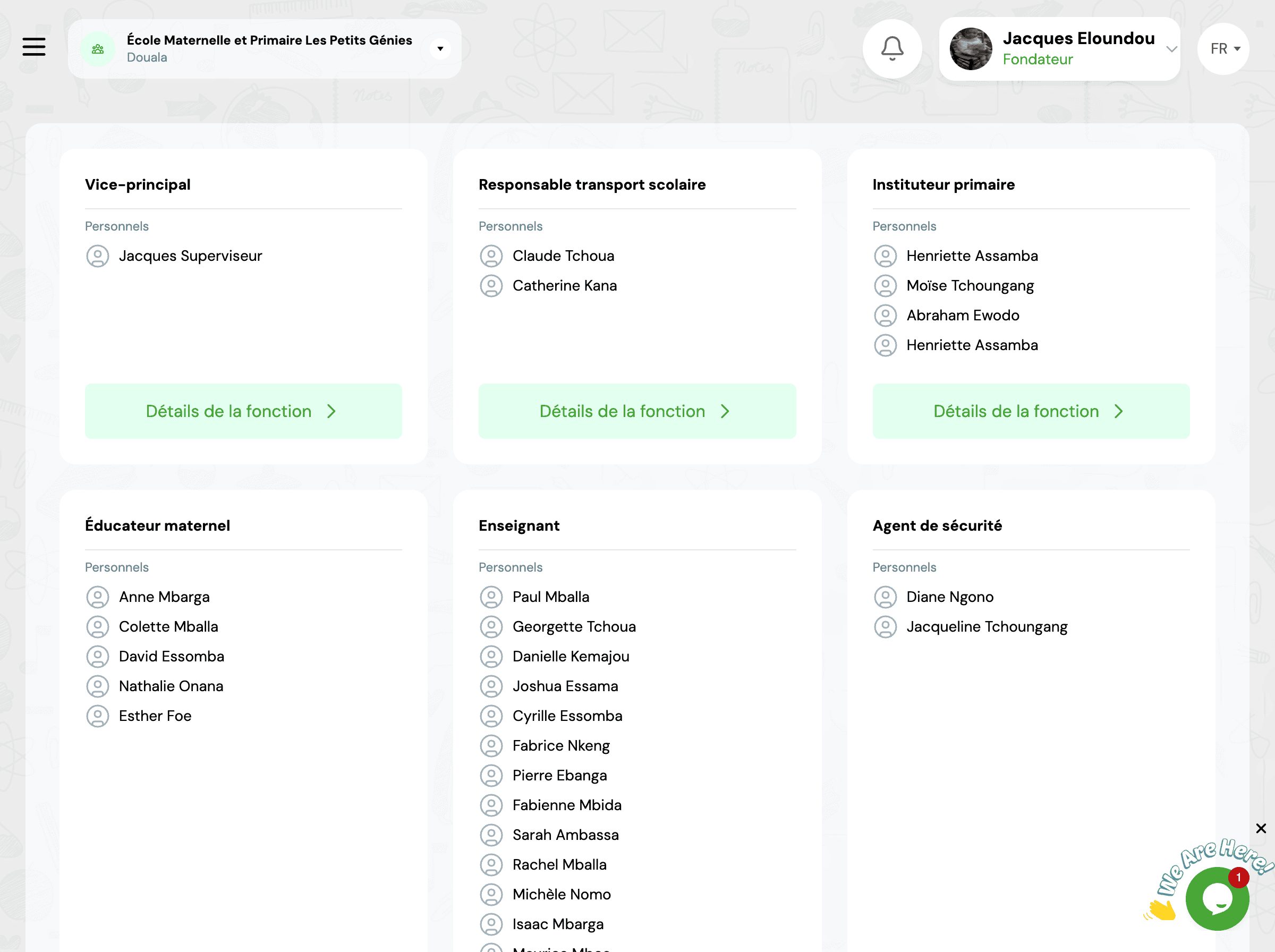
Create a function
Creation steps
-
1
Access the module
GO4SRH → Functions → New function
-
2
Function title
Enter the official function name
Example: Mathematics TeacherExample: Academic Director -
3
Category
Choose the appropriate category
👨🏫Teaching📋Administration👥Management🔧Support -
4
Description (optional)
Describe the main responsibilities and missions
"Teaches mathematics to students, prepares courses and evaluations, participates in pedagogical meetings and ensures individual student follow-up."
-
5
Department (optional)
Associate the function with a department if your structure requires it
-
6
Save
Validate to create the function
Default functions
The system offers common default functions (Principal, Teacher, Accountant, etc.) that you can use directly or adapt to your needs. This speeds up the initial configuration of your organizational chart.
Function hierarchy
Function hierarchy structures the organizational chart and defines reporting relationships.
Define hierarchy
Superior function
When creating or modifying a function, specify which function is hierarchically superior.
Example:
Teacher → Reports to → Academic Director
Organizational chart visualization
The system automatically generates a visual organizational chart based on defined hierarchical relationships.
Impact of hierarchy
Hierarchy automatically determines: (1) Who can approve leave requests, (2) Who performs evaluations, (3) The cascade of notifications and approvals, (4) Access to reports and statistics.
Permissions and roles
Functions can be linked to GO4SCONFIG system roles to define access permissions.
Associate a role with a function
When creating a staff member, you can assign them a system access role based on their function.
Function → Suggested role
Permissions by role
Roles determine what each user can do in the system:
- • View data
- • Create/Edit/Delete
- • Approve requests
- • Access reports
- • Configure settings
⚠️ Role and permission management is done in GO4SCONFIG → Roles. HR functions are simply associated with roles to facilitate assignment when creating staff.
Manage functions
✏️ Edit a function
- 1. Click on the function's ⋮ menu
- 2. Select "Edit"
- 3. Make changes
- 4. Save changes
💡 Function modifications affect all staff members with this function
🗑️ Delete a function
- 1. Click on the function's ⋮ menu
- 2. Select "Delete"
- 3. Confirm deletion
⚠️ A function can only be deleted if no staff member is assigned to it
📊 Statistics
For each function, view:
- • Number of assigned people
- • Occupancy rate (if max headcount defined)
- • Total payroll
- • Average absenteeism rate
🔄 Reassign staff
Change a member's function:
- 1. Access staff file
- 2. Modify current function
- 3. Select new function
- 4. Specify effective date
Frequently Asked Questions
What is the difference between function and role?
The function is the position held in the institution's organizational chart (Teacher, Accountant, Principal, etc.). It defines professional responsibilities. The role is a system access profile that determines what the user can do in GO4SCHOOL (view, create, edit, delete). The same function can have different roles depending on needs.
Can you have multiple functions?
A staff member has a primary function, but may have additional responsibilities. For example, a teacher may also be a "Discipline Coordinator". The system allows adding secondary functions to reflect these multiple responsibilities and adjust evaluation grids accordingly.
How to manage temporary replacements?
For temporary replacement, create a function type "Interim" or "Substitute" and assign the person to it for the determined duration. You can also use secondary functions to temporarily give additional responsibilities without changing the primary function. The history of occupied functions is automatically kept.
Are functions shared between multiple schools?
No, each school manages its own functions independently. Even if two schools have functions with the same name (e.g., "Teacher"), they are two distinct entities with potentially different descriptions, hierarchies or permissions. This allows each school to adapt its structure to its specific needs.
Related Modules
Explore other features related to organizational structure:
Start typing to search the documentation
Quick links

We respect your privacy
We use cookies on our website to give you the most relevant experience by remembering your preferences and repeat visits. By clicking 'Accept', you consent to the use of ALL the cookies.