
Configure Student IDs
Customize your students' ID number format with a dynamic variable system.
Introduction
The student ID is a unique identifier assigned to each student upon enrollment in your institution. GO4SCHOOL allows you to customize the format of these IDs according to your needs and organization.
Good to know
Once configured, the ID format automatically applies to all newly enrolled students. Already assigned IDs are not modified.
Why customize student IDs?
Quick identification
Consistent format facilitating student identification and search
Compliance
Compliance with your institution's standards and conventions
Traceability
Inclusion of information such as enrollment year in the ID
Available Variables
To create your custom format, you have several dynamic variables that will be automatically replaced with corresponding values during ID generation.
{school}
School code
Unique identifier of your school institution
Example: GO4S, SCHOOL01, LYC
{year}
Enrollment year
Academic year when the student was enrolled
Example: 2024, 2025, 24, 25
{order}
Order number
Sequential unique number for each new student
Example: 001, 002, 0001, 1, 42
{initials}
Student initials
First letters of the student's last and first name
Example: JD (John Doe), MK (Marie Kamga)
Important
Variables must be surrounded by curly braces
Configure Format
Configuration steps
- 1 In the sidebar menu, click on GO4SCONFIG
- 2 Select General
- 3 Go to the Student ID
- 4 In the "ID format" field, enter your custom format using variables
- 5 Check the preview to ensure the format matches your expectations
- 6 Click on Save
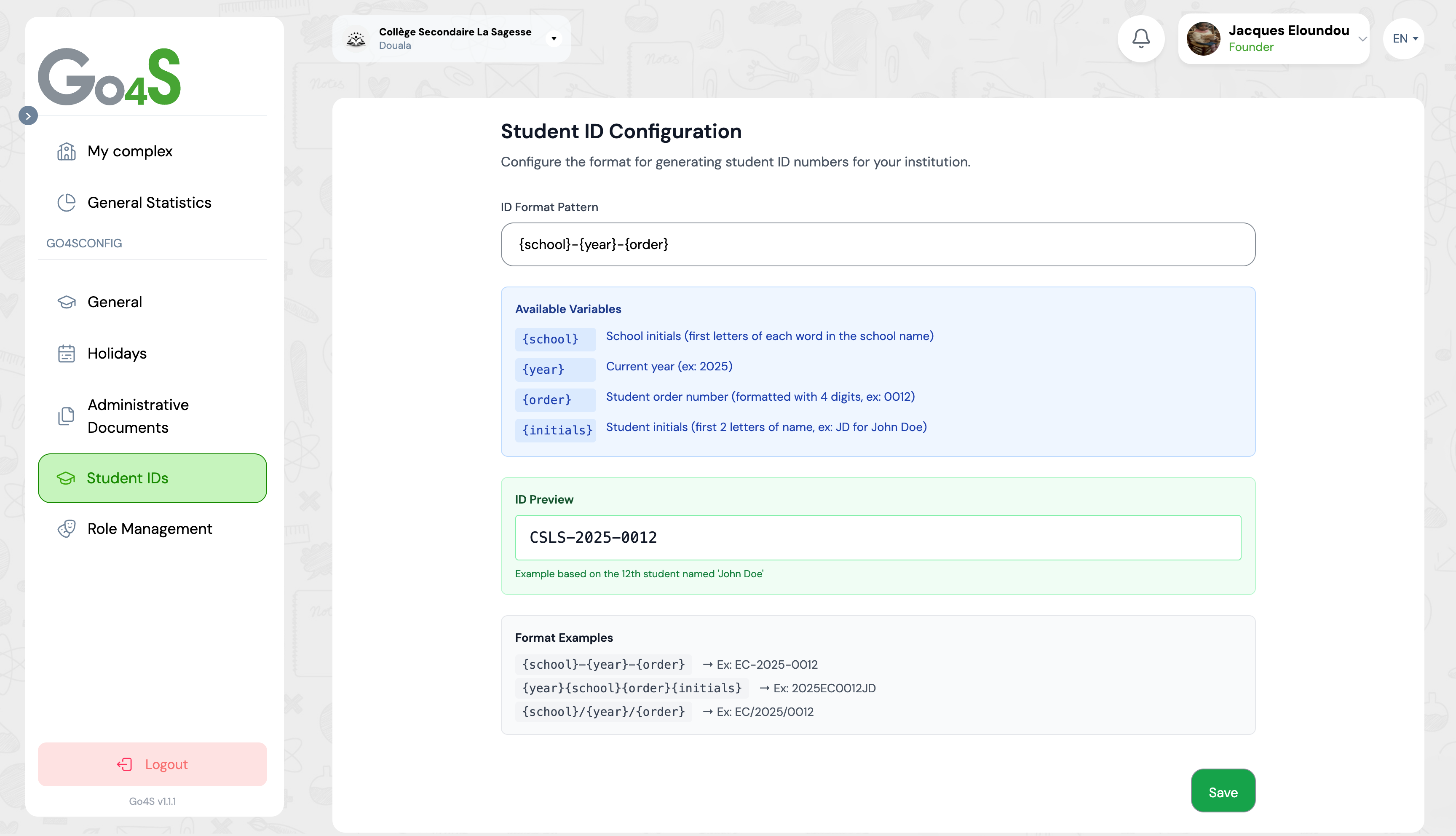
Configuration interface with input field and preview
Practical Examples
Here are different examples of student ID formats adapted to various needs and contexts.
Standard format with separators
Template:
{school}-{year}-{order}
Result:
GO4S-2024-001
✓ Clear and readable format
✓ Ideal for most institutions
Compact format without separator
Template:
{year}{school}{order}{initials}
Result:
2024GO4S001JD
✓ Very compact format
✓ Includes initials for better traceability
Format with slash (folder style)
Template:
{school}/{year}/{order}
Result:
GO4S/2024/001
✓ Hierarchical style
✓ Easy to organize in archives
Format with custom prefix
Template:
ELEVE-{year}-{order}
Result:
ELEVE-2024-001
✓ Includes fixed prefix "STUDENT"
✓ Very explicit for identifying ID type
Minimalist format
Template:
{order}
Result:
001
✓ Simplest format
✓ Sequential numbering only
Preview the Result
Before saving your format, GO4SCHOOL displays a real-time preview of the ID that will be generated for the next enrolled student.
How preview works
Automatic update
Preview updates instantly with each format modification
Real data
Uses real data from your school (code, year, next order number)
Visual validation
Allows you to verify that the format matches your expectations before applying it
Preview area displaying a sample generated ID
Tip
Test different formats and observe the preview to choose the one that best suits your institution. Don't hesitate to experiment before saving.
Best Practices
Configure before first enrollment
Define your ID format BEFORE enrolling your first students to ensure consistency
Include enrollment year
Adding {year} allows quick identification of the student's cohort and facilitates archiving
Use clear separators
Dashes or slashes make the ID more readable: GO4S-2024-001 is clearer than GO4S2024001
Avoid overly long formats
An ID that is too long becomes difficult to memorize and communicate. Favor simplicity
Think long-term
Choose a format that will remain valid for several years without requiring modifications
Test before validating
Use the preview to verify that the format generates the expected result
Frequently Asked Questions
Can I modify the format after enrolling students?
Yes, you can modify the format at any time. However, this modification will only affect NEW students enrolled after the change. Already assigned IDs will not be modified, which may create inconsistency in your system. It is therefore strongly recommended to properly define your format from the start.
What happens if two students have the same initials?
This is not a problem! If you use the {initials} variable, students with the same initials will still have different IDs thanks to other variables (especially {order} which is always unique). For example: GO4S-2024-001-JD and GO4S-2024-002-JD are two distinct IDs.
How does the {order} variable work?
The {order} variable generates a sequential number that automatically increments with each new enrollment. The first student will have 001, the second 002, and so on. This number guarantees ID uniqueness and allows knowing the enrollment order of students in your institution.
Can I use special characters in the format?
Yes, you can use most characters: dashes (-), slashes (/), periods (.), underscores (_), etc. However, it is recommended to avoid overly complex characters that could cause problems in certain contexts (exports, printing, etc.). Favor standard characters.
Is the ID visible to parents on the portal?
Yes, the student's ID number is visible to parents on their personal space and can be used to identify the student during payments, communications, or document requests. It is an important identifier that facilitates all interactions with the institution.
Next Steps
Now that you have configured your student IDs, discover these other settings:
Start typing to search the documentation
Quick links

We respect your privacy
We use cookies on our website to give you the most relevant experience by remembering your preferences and repeat visits. By clicking 'Accept', you consent to the use of ALL the cookies.